
PIM implementation

PIM implementation: master PIM projects in four steps

In brief: A PIM implementation succeeds when content rules, responsibilities and target channel requirements are defined before the system is configured. We follow four steps: content rules, content ownership, content technology and implementation.
4 stepsfrom content rules to implementation
6–12 monthsuntil the first channel goes live in a mid-sized business
Data migrationthe part most often underestimated
Governanceclear responsibilities determine success

The four steps of a PIM implementation

The sequence is deliberate: content and responsibilities first, technology second. Starting with the software often means simply recreating the problems of legacy systems.

1

Define content rules

The starting point is understanding how items, products and product groups relate to one another, along with their properties and relationships. This forms the basis of the data model with its categories, attributes and relationships. It also includes the processes for creating, translating, enriching and exchanging all content and media.

Deliverables: Data model, attribute catalogue for each product group, process map
2

Clarify content ownership

Who maintains which data, and who approves it? Responsibility should sit where the data delivers the greatest value. Define data owners and creators, roles, organisational structures and an operating model with the necessary resources. PIM projects fail more often because these questions remain unresolved than because of technical issues. See Data Governance.

Deliverables: Role and approval framework, operating model, resource plan
3

Select content technology

The rules and responsibilities guide the selection and configuration of the PIM system. The IT landscape is designed around automated data flows: a flowchart showing integrations and formats, the division of responsibilities between PIM and DAM, supplier integration, a transition model, and print and mobile applications. Our PIM selection page explains how we find the right system.

Deliverables: Target architecture, integration design, system selection decision
4

Plan implementation

Implementation requires clear objectives and a roadmap: an implementation plan, cost and resource planning, quick wins, change management, project organisation, risks and alternatives. For an overview of expected costs, see PIM implementation & costs.

Deliverables: Roadmap with milestones, budget, project organisation
Key questions to prepare for each step

Content rules: Which product groups do you have, and which attributes does each need? Which classifications do customers and retailers require (ETIM, ECLASS, GS1)? Which relationships are needed, such as accessories, spare parts and variants?

Content ownership: Who creates new items, and who adds technical data, marketing copy, images and translations? Who approves content for each channel? How many hours per week are actually available for this work?

Content technology: Which system is the system of record for which data (ERP, PIM, DAM, PLM)? Which channels and formats need to be supported? Cloud or self-hosted?

Implementation: Which product group and channel should we start with? How will we measure success? Who will lead the project on the business side?

Project phases and timeline

In practice, the four steps span six project phases. The timings are indicative, based on projects in mid-sized businesses. Product range size, data quality and the number of interfaces can change them significantly.

1Analysis & target state4–8 weeksCurrent-state assessment, channels, data quality, business case
2Selection2–3 monthsRequirements, shortlist, demos using your own data
3Solution design1–2 monthsData model, workflows, interfaces, roles
4Implementation & migration3–6 monthsConfiguration, ERP integration, data migration
5Pilot & rollout1–2 monthsFirst product group, first channel, training
6Operations & expansionOngoingAdditional channels, languages, automation

Highlighted in dark: the core implementation up to the first live channel (usually 6–12 months).

Step by step rather than a big bang: how to start small

A proven approach is to start with a clearly defined scope: one representative product group, one channel (usually your own online shop) and the most important languages. This tests the data model early with real data, gives business teams tangible results within a few months and reveals design flaws while they are still inexpensive to fix.

Further product groups, channels and automation then follow in defined stages. The key is to design the data model for the entire product range from the outset, even if only part of it is populated initially.

Where does your business stand?

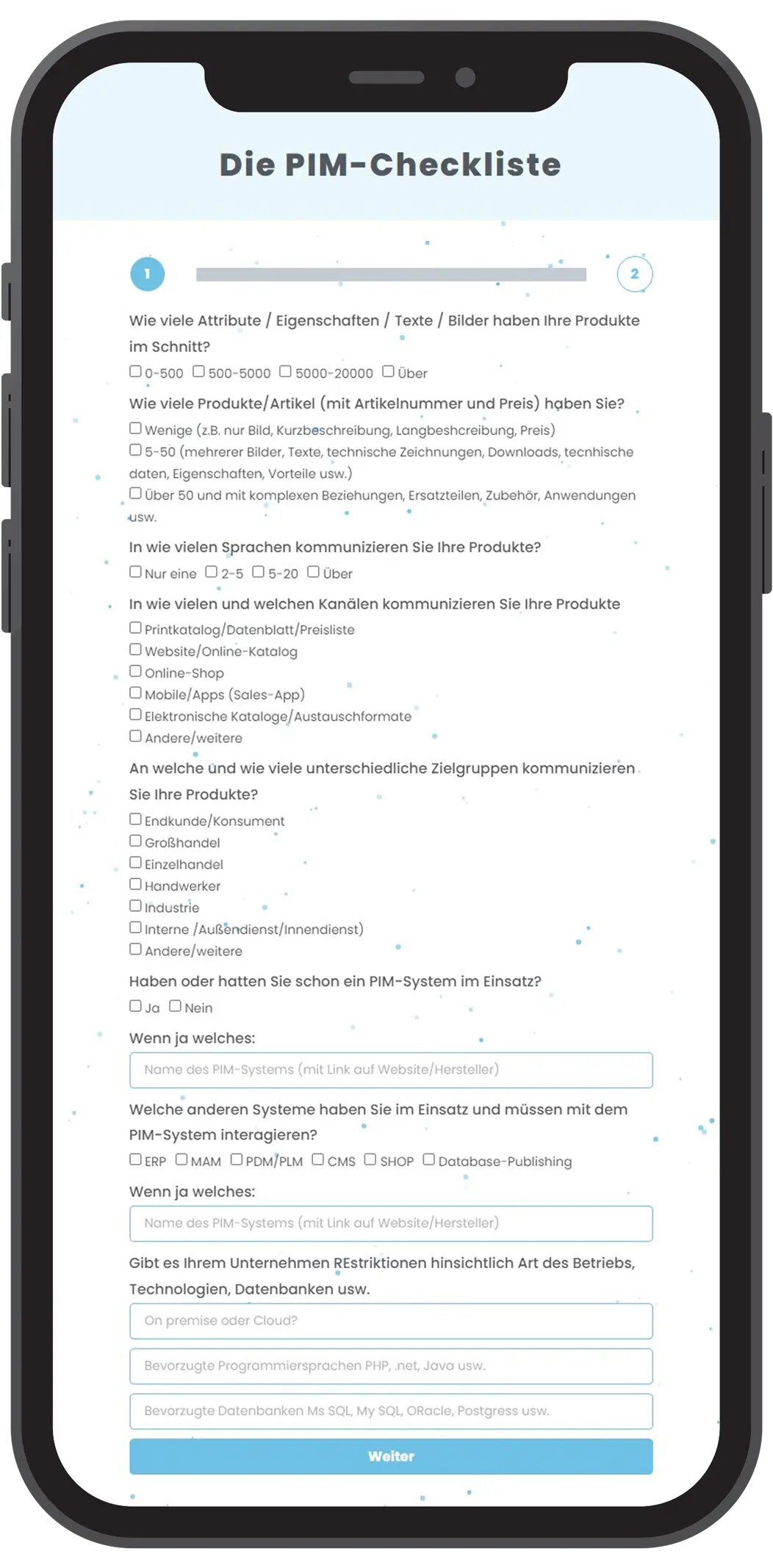
Use the PIM checklist to find out in three minutes whether a PIM system is worthwhile for your business and which systems could be a good fit. We will email you an initial shortlist.

  • Free
  • Vendor-neutral
  • Complete in 3 minutes
Go to the PIM checklist

The Golden Record: plan around the output

The goal of implementation is to flexibly serve every channel and publication with data and media for all products. This requires a consolidated master record, the Golden Record. It contains all information about a product in all its variations, and every channel draws on it.
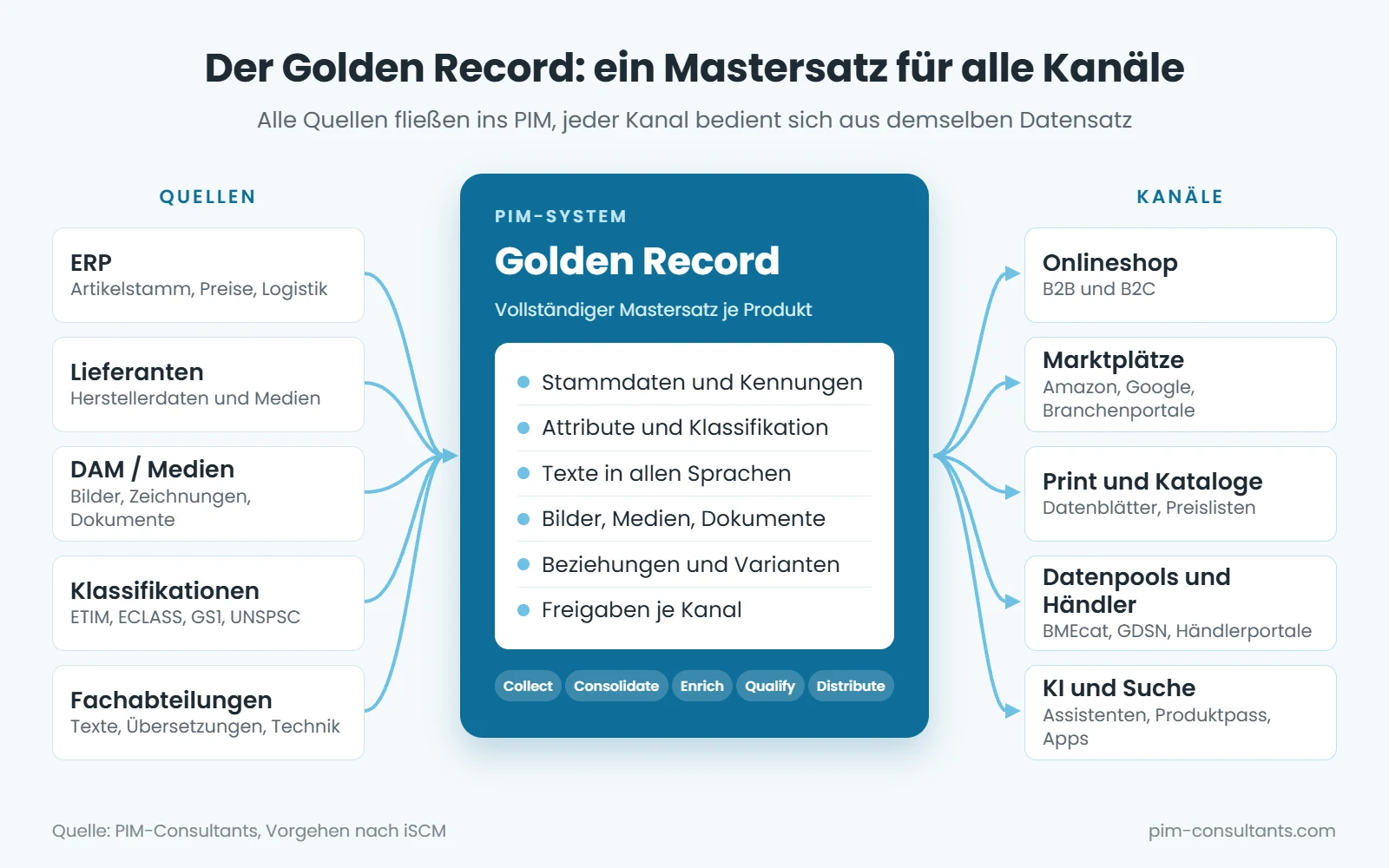
Grafik Golden Record: Quellen wie ERP, Lieferanten, DAM und Klassifikationen fließen ins PIM-System, aus dem Onlineshop, Marktplätze, Print, Datenpools und KI-Anwendungen versorgt werden
The Golden Record brings all sources together in a single master record that feeds every channel.

We plan the Golden Record around the output, starting with the key channels and using representative examples of the most important products. Only once we have established what we want to show to whom, which shop features we need, and how creation, updates and approval will work can we reliably define hierarchies, relationships, master data and transactional data in PIM, ERP and CRM.

Which system is the source of truth for which data?

One of the most important implementation decisions is to define the system of record for each data type. A typical allocation:

  • ERP: item numbers, prices, inventory, logistics and customs data
  • PIM: attributes, marketing and technical copy, translations, classifications, relationships, channel approvals
  • DAM: images, videos, drawings, documents with usage rights
  • PLM/PDM: development data, bills of materials, core technical data

Each data element has exactly one system of record. Maintaining the same data in two places is the most common cause of conflicting data across channels.

Technical implementation in three parts

User stories for each task

Implementation is guided by user stories for the tasks the PIM performs: collecting data (Collect), cleansing it (Consolidate), enriching it (Enrich), validating it (Qualify), distributing it (Distribute) and managing it with version control, permissions and workflows.

Data migration

The most demanding part. The ERP interface must work reliably, as its master data usually forms the basis for all product data. Supplier data and classifications such as ECLASS or ETIM are also included. Your own data is then classified, mapped and enriched.

Distribution

Once centralised data management is in place, the channels are connected: online shop, marketplaces, print, data pools and retailers. Each channel has its own formats, fields and approvals.

Seven-step data migration checklist
  1. Identify sources: List ERP, Excel spreadsheets, legacy systems, the online shop, supplier data and media repositories, noting who is responsible and how up to date each source is.
  2. Measure data quality: Check samples from each product group for completeness, duplicates, units and spelling consistency. This establishes the baseline for measuring success later.
  3. Define the mapping: Map each source field to the new data model and define conversions and value lists. Make a deliberate decision to discard fields with no target.
  4. Cleanse where it matters: Cleanse critical attributes before migration, then address the rest in the PIM using workflows and quality rules.
  5. Run a sample migration: Migrate a representative product group in full and review it in the target channel, not just in the database.
  6. Obtain business sign-off: Product management and marketing check the content and presentation before further groups are migrated.
  7. Plan the cutover: Set the cutover date, the data maintenance freeze in the legacy system and the migration of final changes. Then systematically shut down legacy systems or make them read-only.

The project is a good opportunity to put your data in order. Waiting for perfect data, however, only delays implementation.

Roles in a PIM project

Product management, marketing, e-commerce, sales, technical documentation, translation and IT all work with the PIM, often alongside suppliers and agencies. The project itself needs clearly assigned roles:

RoleResponsibilitiesTypically drawn from
SponsorSets objectives and budget, resolves conflicting priorities between departmentsSenior management
PIM Product OwnerDefines the target vision and priorities, provides business sign-offProduct management or e-commerce
Data OwnerAccountable for a data domain, such as technical data or marketing copyBusiness departments
Data StewardRules, quality checks, ongoing data maintenanceProduct data management
Key UserTests, trains colleagues and provides feedback from day-to-day useAll participating departments
IT / IntegrationInterfaces, operations, permissions, securityInternal IT
Implementation PartnerConfiguration, development, technical migrationSoftware vendor's service provider
PIM ConsultantVendor-neutral selection, solution design and quality assuranceExternal consultancy

The article Service partner or in-house team explores whether to implement with a partner or your own team.

Common mistakes and how to avoid them

Most PIM projects run into trouble not because of the software, but because of organisational issues, data and the approach taken. We see these patterns time and again in projects:

Treating PIM as a purely IT project

The software is purchased, but processes and responsibilities stay the same. The same gaps and inconsistencies simply end up in a new system.A better approach: Business teams lead, IT implements. The Product Owner comes from product management or e-commerce.

Underestimating data migration

Legacy data from ERP, Excel and online stores is almost always less complete and less consistent than expected. Mapping, cleansing and enrichment take more time than configuration.A better approach: Assess data quality using representative samples before selection, and plan migration effort separately.

Waiting for perfect data

Some companies postpone implementation until all their data has been cleansed. This rarely works without the right tools.A better approach: Cleanse critical attributes upfront, then improve the rest in the PIM system using quality rules and workflows.

Implementing everything at once

Launching all product groups, channels and languages on the same date significantly increases risk and extends timelines.A better approach: Start with one product group and one channel, then expand in clearly defined stages.

Replicating the legacy system exactly

Simply copying fields and structures from ERP or Excel misses the opportunity to build a clean data model tailored to your channels.A better approach: Design the data model around output requirements: What does each channel and each customer need?

Involving users too late

If the people maintaining the data only see the system at rollout, user buy-in and practical feedback will be missing.A better approach: Involve key users from the design stage, test early with real data, and plan for training.

Failing to establish a baseline

Without figures from before the project, it is difficult to demonstrate the benefits later or secure funding for subsequent phases.A better approach: Measure completeness, data maintenance effort and time-to-market before the project starts.

Measuring success: KPIs for PIM implementation

Before the project starts, define how success will be measured and establish your baseline. A small set of clearly measurable KPIs has proven effective:

KPIWhat is measured
CompletenessPercentage of required attributes populated for each product group and channel
Time-to-marketDays from creating an item in the ERP to approval for all channels
Data maintenance effortMinutes per new item or update, across everyone involved
Errors and queriesComplaints about product data, queries from retailers, marketplace rejections
Channel coverageNumber of items available across channels and languages
User adoptionActive users, data maintenance outside the PIM (separate Excel spreadsheets), satisfaction

Additional priorities today: compliance and AI

New EU requirements and AI applications are increasing the demands on structured product data. If you are planning your data model now, consider the following:

Digital Product Passport (ESPR)

The Ecodesign for Sustainable Products Regulation (ESPR) introduces the Digital Product Passport in stages. The first is the battery passport under the Batteries Regulation, from 18 February 2027; other product groups such as textiles, furniture and tyres will follow through delegated acts. Required information includes materials, origin, repairability and recycling, data that is currently scattered across many businesses. A PIM is a natural source for this data.

Packaging and Packaging Waste Regulation (PPWR)

The EU Packaging and Packaging Waste Regulation has applied since 12 August 2026. Packaging requires, among other things, a declaration of conformity and technical documentation, with stricter requirements for recyclability and recycled content taking effect from 2030. Packaging data for each item should therefore be included in the data model from the outset.

General Product Safety Regulation (GPSR)

Since 13 December 2024, online listings have been required to include manufacturer details, product identification, warnings and safety information, among other things. This information belongs in the PIM as dedicated attributes so that it appears automatically in online shops and on marketplaces.

AI in data maintenance

AI can draft and translate content, classify products and identify gaps. But this only works with clearly structured attributes and well-defined rules. When planning the implementation, include workflows for reviewing and approving AI suggestions, and document which content may be generated automatically. AI assistants and search engines are also increasingly accessing structured product data.

Frequently asked questions about PIM implementation

How long does a PIM implementation take?

For mid-sized businesses, implementation through to the first live channel often takes six to twelve months. This is preceded by selection, which usually takes two to three months.

What is the most difficult part of a PIM implementation?

Almost always data migration: legacy data from ERP, Excel and older systems needs to be cleansed, mapped to the new data model and enriched. The effort involved is routinely underestimated.

What is a Golden Record?

The Golden Record is the complete master record for a product in the PIM. It contains all the data, text, media and relationships that every channel can draw on.

Do I need an integration partner for implementation?

Usually yes, at least for configuration and interfaces. However, business tasks such as defining the data model, assigning responsibilities and maintaining data remain in-house.

Should a PIM be implemented in phases or all at once?

In phases. Starting with one representative product group and one channel has proven effective. The data model should still be designed for the entire product range from the outset.

Can we start with our Excel data?

Yes. In many projects, Excel spreadsheets are the most important source alongside the ERP. Critical attributes should be cleansed before import; the rest can be improved in the PIM using data quality rules.

How much does a PIM implementation cost?

In addition to licence or subscription fees, there are costs for implementation, interfaces and data migration, plus internal effort from business departments, which is often underestimated. For an overview, see PIM implementation & costs.

How can I tell whether we are ready for a PIM?

Typical signs include product data spread across numerous Excel spreadsheets, long lead times before new items go online, inconsistent information across channels and growing demands from retailers and marketplaces. The PIM checklist provides an initial assessment.

Is your business ready for PIM implementation?

We provide a vendor-independent review of your data model, processes, organisation and systems, and identify where adjustments are needed before the project starts.

Request an assessment

Just getting started? Begin with the free PIM checklist or get in touch directly: Contact.

PIM KNOWLEDGE

News & Blog

Have any questions?

We’re happy to advise you.

Wait! Have you seen our PIM checklist?

Find out in 3 minutes whether a PIM system could benefit your business and which PIM systems could be right for you!

Webdesign: Deutsche Stadtmarketing